

House General




Kitchen

Dishwasher
- Turn on and load
Open the door and press the On / Off button to turn the appliance on. - Fill the detergent dispenser
Open the detergent dispenser and introduce the detergent into the dry dispenser only. Close the lid of the detergent dispenser by pulling it up until the closing device is secured in place. - Choose a Program
Select the most appropriate program in accordance with the type of crockery and its soiling level by pressing the button and then select the desired options. - Run the Program
Start the wash cycle by pressing START/Pause button (led going from flicker to lit) and closing the door within 4 sec. When the program starts you hear a single beep. If the door was not close with 4 sec., the alarm sound will be played. In this case, open the door, press START/Pause button and close the door again within 4 sec. - End of wash cycle
The end of the wash cycle is indicated by beeps and by the flashing of the wash cycle number on the display. Open the door and switch off the appliance by pressing the ON/OFF button. Wait for a few minutes before removing the crockery - to avoid burns. Unload the racks, beginning with the lower one. - Instructions

- On-Off/Reset Button with indicator light
- Program Selection Button
- Salt refill indicator light
- Rinse Aid refill indicator light
- Program number and delay time indicator
- Tablet indicator light
- Display
- Half Load indicator light
- Half Load Button
- Delay button
- Start/Pause button with indicator light/Tab
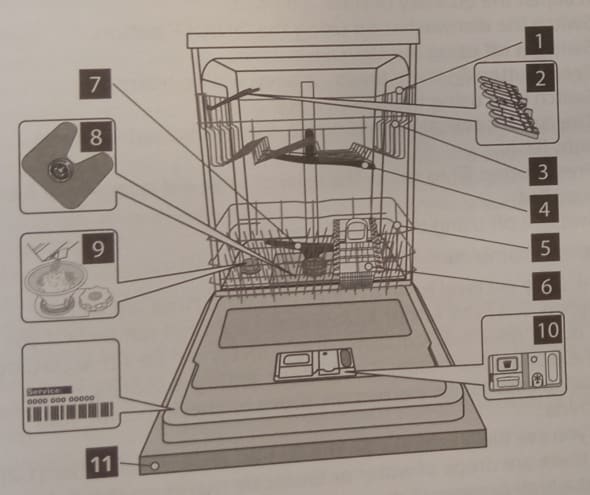
- Upper rack
- Foldable flaps
- Upper rack Height adjuster
- Upper sprayer arm
- Lower rack
- Cutlery basket
- Lower
- Filter Assembly
- Salt reservoir
- Detergent and Rinse Aid dispenser
- Control panel